

ENC28J60 Arduino Wiring: Complete Guide for Reliable Ethernet Integration
Reliable Ethernet on Arduino is not magic.
It is discipline.
Correct wiring. Clean power. Proper logic levels.
The ENC28J60 Ethernet controller is powerful, affordable, and flexible—but only if you wire it correctly. This guide cuts through confusion and gives you battle-tested wiring practices that work on real hardware, not just theory.
“An engineer is only as good as their power and ground.” — Embedded Systems Proverb
This article focuses on search intent: wiring accuracy, electrical safety, and long-term stability. No fluff. No shortcuts.
Understanding ENC28J60 and Arduino Compatibility
What the ENC28J60 Ethernet Controller Does
ENC28J60 is a standalone Ethernet controller with integrated MAC and PHY. It handles:
- Ethernet frame transmission
- PHY-level signaling (10BASE-T only)
- SPI communication with a host MCU
What it does not do:
- TCP/IP stack
- DHCP, DNS, or sockets
Those live in Arduino software libraries.
Why ENC28J60 Is Commonly Used with Arduino
ENC28J60 remains popular because it is:
- Low cost compared to W5500 shields
- SPI-based, compatible with most MCUs
- Available as compact breakout modules
For memory-limited boards, ENC28J60 is both a strength and a challenge.

ENC28J60 Module Variants and Hardware Overview
Common ENC28J60 Module Types and Board Differences
Not all modules are equal.
| Module Type | Key Traits | Notes |
|---|---|---|
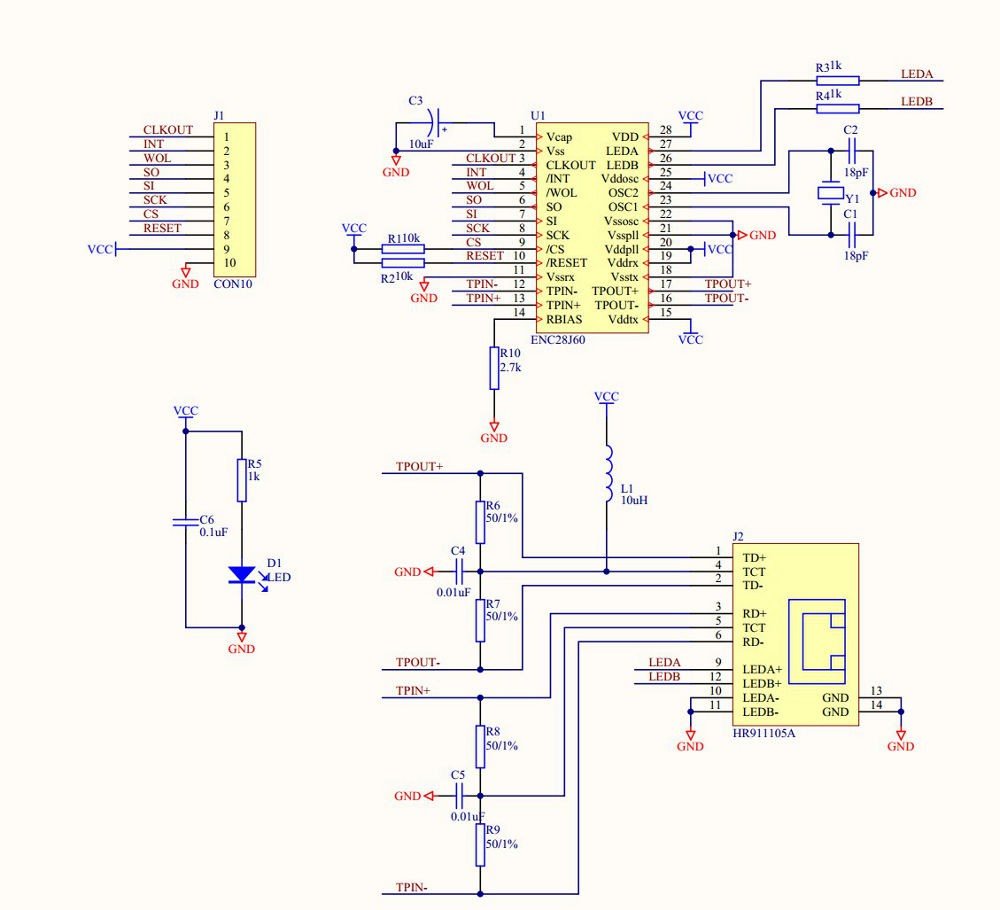
| HanRun HR911105A | Integrated magnetics + RJ45 | Most common, stable |
| LC-Tech boards | Compact layout | Often weak regulators |
| Generic no-name | Varies wildly | Inspect before use |
Integrated magnetics reduce noise and wiring errors. External magnetics demand careful PCB design.
Power Requirements and Voltage Constraints (3.3V Only)
ENC28J60 must run at 3.3V.
No exceptions. No tolerance.
Absolute maximum I/O voltage: 3.6V
A single 5V spike can permanently damage the chip.
ENC28J60 Arduino Wiring Fundamentals
SPI Communication Basics for ENC28J60
ENC28J60 uses SPI Mode 0:
- CPOL = 0
- CPHA = 0
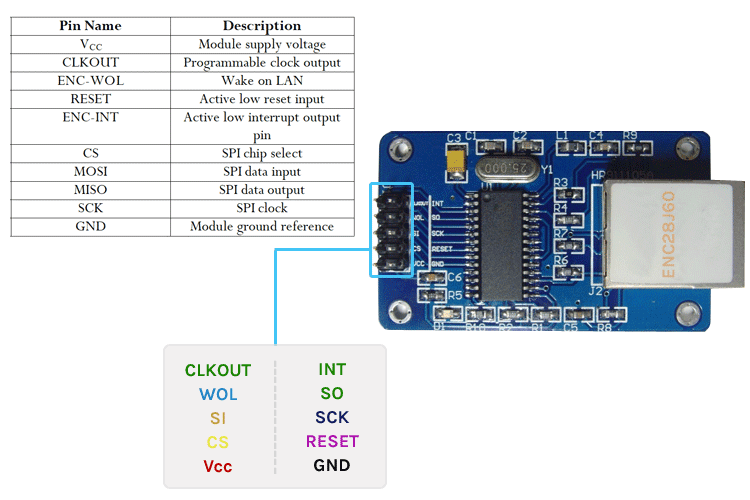
Signals required:
- SCK
- MOSI
- MISO
- CS
Optional but recommended:
- RESET
- INT
Hardware SPI vs Software SPI
Use hardware SPI whenever possible.
Software SPI works—but it is slower and less stable.
Hardware SPI advantages:
- Cleaner timing
- Lower CPU load
- Better signal integrity
ENC28J60 Arduino Wiring Diagrams and Tables
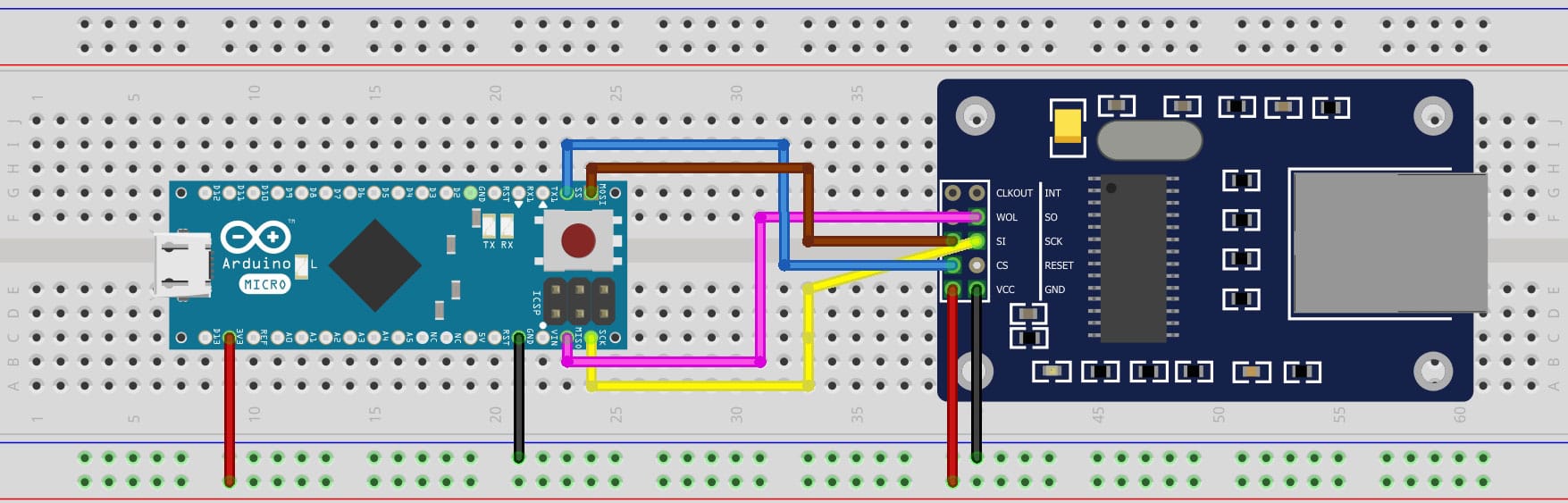
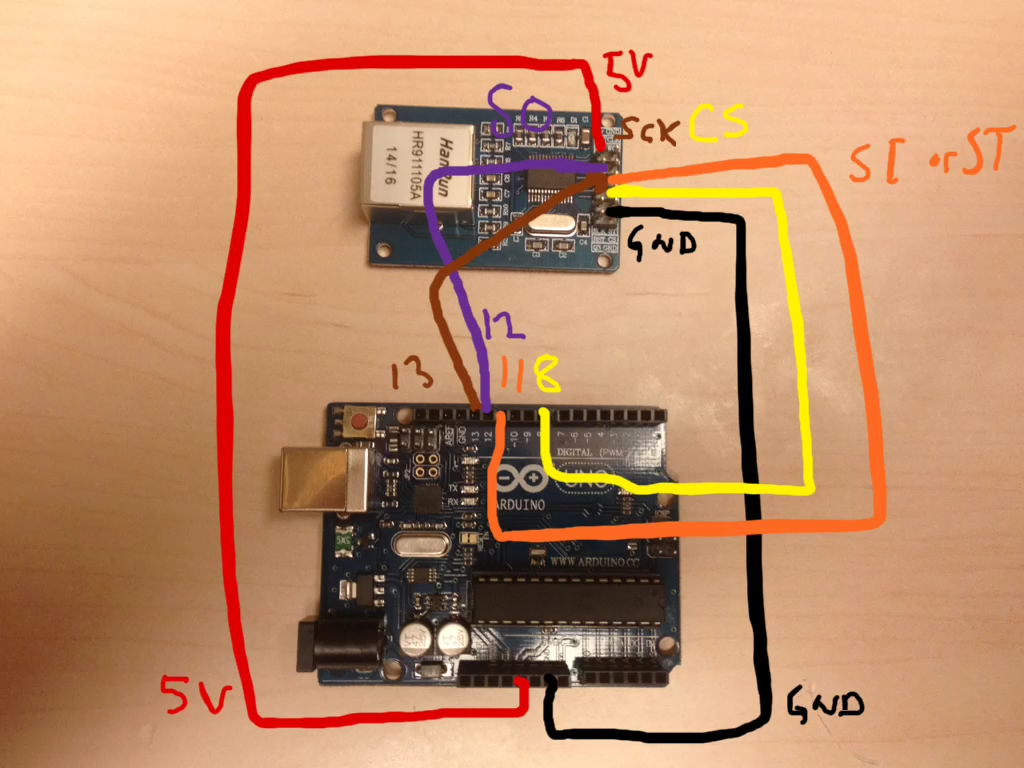
Standard SPI Wiring Between ENC28J60 and Arduino
| ENC28J60 Pin | Arduino Uno / Nano | Arduino Mega |
|---|---|---|
| VCC | 3.3V | 3.3V |
| GND | GND | GND |
| SCK | D13 | D52 |
| MOSI | D11 | D51 |
| MISO | D12 | D50 |
| CS | D10 | D53 |
| RESET | Optional GPIO | Optional GPIO |
| INT | Optional GPIO | Optional GPIO |
Breadboard Wiring vs Soldered Connections
Breadboards are convenient—but electrically noisy.
| Method | Stability | Recommendation |
|---|---|---|
| Breadboard | Low | Reduce SPI speed |
| Dupont wires | Medium | Keep short |
| Soldered PCB | High | Best choice |
Reset, Interrupt, and Optional Pin Handling
RESET Pin: Required vs Optional Usage
RESET is strongly recommended.
Without RESET:
- Power-on timing becomes unreliable
- Brownouts cause silent failures
Best practice:
- Tie RESET to Arduino GPIO
- Assert LOW for 1–10 ms during startup
INT Pin: When to Use Interrupts
INT improves performance but is optional.
Use INT if:
- You handle frequent packets
- You need low-latency responses
Leave INT floating only if library supports polling.
Power Supply Design and Stability
Powering ENC28J60 from Arduino 3.3V Pin
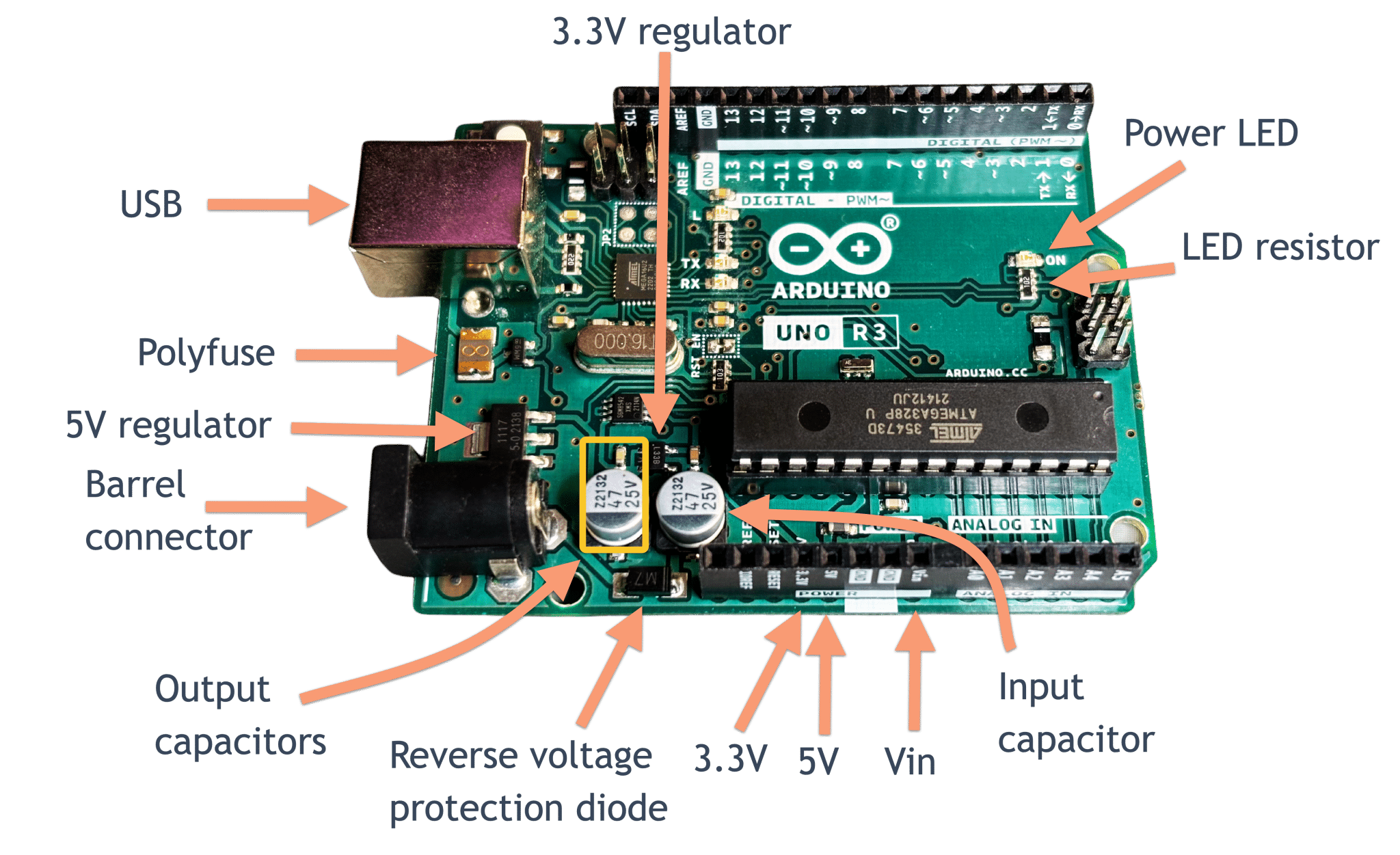
Arduino 3.3V pins are often weak.
Typical limits:
- Uno: ~50 mA
- ENC28J60 peak: 180 mA
This mismatch causes:
- Ethernet link drops
- Random resets
- PHY lockups
Using External LDO Regulators for Stability
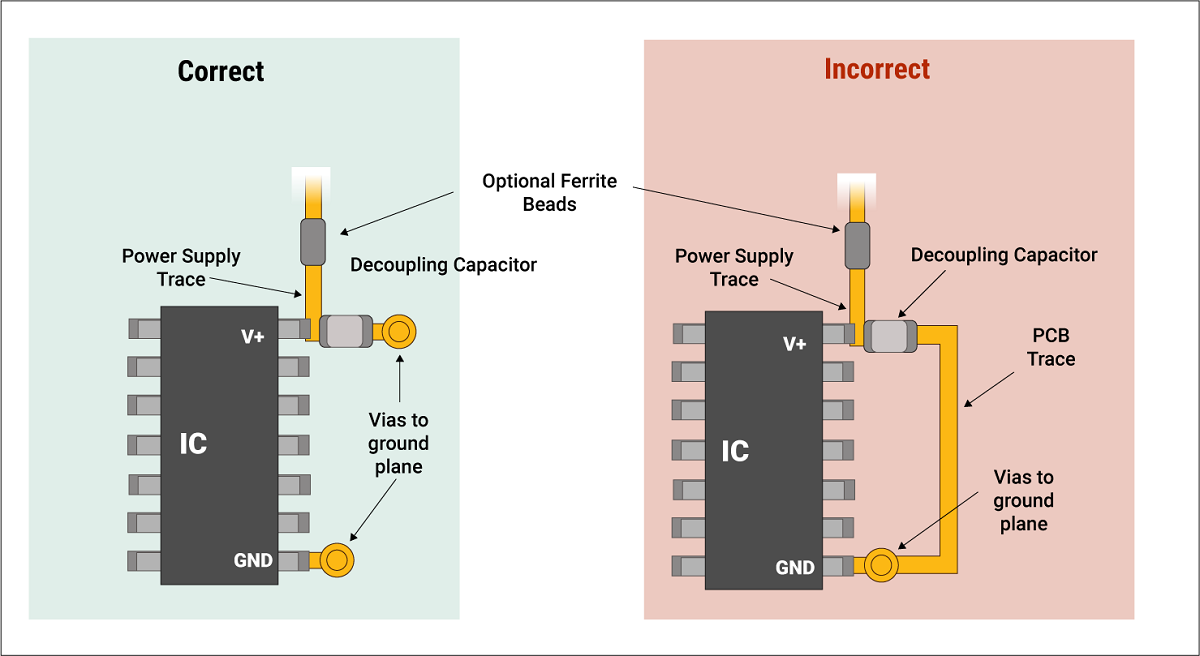
Use a dedicated 3.3V LDO, rated ≥300 mA.
Add capacitors:
- 100 nF close to VCC pin
- 10–47 µF bulk capacitor
“Power integrity is signal integrity.”
Logic-Level Compatibility and Protection
3.3V ENC28J60 vs 5V Arduino Logic
ENC28J60 is not 5V tolerant.
Risk zones:
- MOSI
- SCK
- CS
When Level Shifters Are Required
If Arduino runs at 5V:
- Use resistor dividers (simple, slow)
- Or MOSFET level shifters (clean, fast)
| Method | Speed | Safety |
|---|---|---|
| Direct 5V | Fast | ❌ Dangerous |
| Resistor divider | Medium | ✅ Acceptable |
| MOSFET shifter | High | ✅ Best |
SPI Signal Integrity and Wiring Limitations
Maximum Recommended SPI Wire Length
Keep SPI lines:
- Under 10 cm on breadboards
- Under 20 cm with twisted wires
Long wires cause:
- Ringing
- Crosstalk
- CRC errors
Reducing SPI Clock Speed for Breadboards
Set SPI speed to:
- 4 MHz or lower
- Even 1–2 MHz for unstable setups
Slower clocks = higher reliability.
Required Libraries and Software Setup
Recommended ENC28J60 Arduino Libraries
Popular options:
- UIPEthernet
- EtherCard
Key configuration values:
- MAC address
- Static IP or DHCP
- SPI clock speed
Common Configuration Parameters
| Parameter | Typical Value |
|---|---|
| SPI Clock | 4–8 MHz |
| MAC | Locally administered |
| MTU | 1500 |
Testing and Verifying Wiring

Electrical Verification of SPI Signals
Before software debugging:
- Check 3.3V under load
- Verify CS toggles
- Scope SCK if possible
Checking Link LEDs and PHY Status
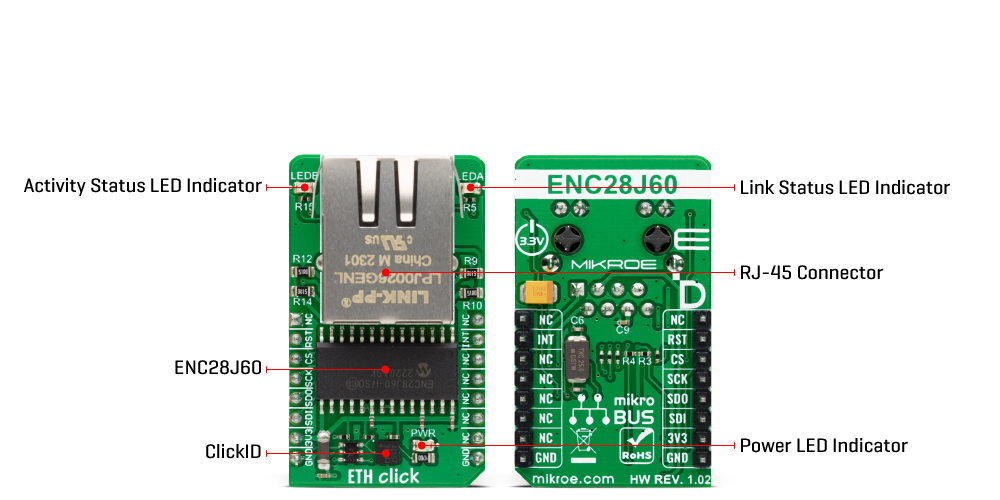
LED meanings:
- Solid green: Link OK
- Blinking: Traffic
- No light: PHY or power issue
Simple Network Test Workflow
- Upload example sketch
- Open serial monitor
- Ping assigned IP
- Observe LED activity
Troubleshooting ENC28J60 Arduino Wiring Issues
Common Wiring Mistakes and How to Avoid Them
- Using 5V power ❌
- No level shifting ❌
- Weak 3.3V rail ❌
Debugging SPI Communication Failures
If SPI fails:
- Lower clock speed
- Shorten wires
- Check CS polarity
Diagnosing Link and Network Errors
Link but no ping?
- Check MAC uniqueness
- Verify subnet
- Confirm Ethernet cable quality
Practical Applications and Design Trade-Offs
Typical ENC28J60 Arduino Use Cases
- IoT sensors
- Industrial monitoring
- Data logging systems
Cost, Performance, and Memory Trade-Offs
ENC28J60:
- Low cost
- High CPU load
- Software TCP/IP
Choose wisely.
ENC28J60 vs Arduino Ethernet Shields
Wiring Complexity vs Plug-and-Play Shields
| Feature | ENC28J60 | W5500 |
|---|---|---|
| Wiring | Manual | Plug-and-play |
| TCP/IP | Software | Hardware |
| Cost | Low | Higher |
| Stability | Medium | High |
ENC28J60 rewards precision.
Ethernet shields reward simplicity.
Safety, ESD, and Long-Term Reliability
ESD Sensitivity and Handling Precautions
Ethernet ports invite ESD.
Best practices:
- Use shielded RJ45
- Ground the shield properly
- Avoid hot-plugging in dry environments
Reliability Tips for Long-Term Deployments
- Dedicated regulator
- Soldered connections
- Conservative SPI speeds
“Reliability is built, not assumed.”
Final Thoughts
ENC28J60 is not fragile—but it is unforgiving.
Follow electrical rules. Respect voltage limits. Design power correctly.
Do that—and your Arduino Ethernet will run for years without failure.
