


W25Q64 Arduino SPI Library and Example Code: Complete Developer & Sourcing Guide
Introduction to W25Q64 SPI Flash Memory
The W25Q64 is a 64-Mbit (8 MB) serial NOR flash memory that communicates over SPI. Simple on the surface, powerful in practice. It stores data persistently, even when power is gone. That reliability is why engineers trust it.
Inside, memory cells are arranged in pages, sectors, and blocks. You erase first. Then you write. You never overwrite directly. That rule defines how software must behave.
Why is W25Q64 everywhere? Because it is cheap, fast, widely supported, and stable across vendors. Engineers like it. Product managers trust it. Procurement teams can source it globally.
Typical use cases
- Firmware and OTA update storage
- Configuration and calibration data
- Sensor logging and time-series data
- Images, audio clips, and binary assets
“Simplicity is prerequisite for reliability.” — Edsger Dijkstra
W25Q64 Technical Specifications Explained
Understanding the numbers prevents design mistakes.
| Parameter | Value | Practical Meaning |
|---|---|---|
| Density | 64 Mbit (8 MB) | Enough for logs, assets, and firmware |
| Voltage | 2.7 V – 3.6 V | 3.3 V only — not 5 V tolerant |
| SPI Clock | up to 104 MHz | Arduino usually runs much slower |
| Endurance | 100k erase cycles | Plan wear-leveling |
| Data Retention | 20+ years | Long-term storage |
SPI vs Dual vs Quad SPI
- SPI: 1 data line. Supported everywhere.
- Dual SPI: Faster reads. Rarely used on Arduino.
- Quad SPI (QSPI): 4 data lines. Powerful but MCU-dependent.
For most Arduino-class boards, single SPI is the sweet spot. Simple. Predictable. Stable.
W25Q64 Memory Architecture & Command Set
Flash is not RAM. Treat it differently.
| Level | Size |
|---|---|
| Page | 256 bytes |
| Sector | 4 KB |
| Block | 32 KB / 64 KB |
| Chip | 8 MB |
You erase by sector or block, then program by page.
Core commands every developer must know
READ (0x03)– slow, universalFAST READ (0x0B)– faster, needs dummy cyclesPAGE PROGRAM (0x02)– writes up to 256 BSECTOR ERASE (0x20)– clears 4 KBWRITE ENABLE (0x06)– mandatory before writesREAD STATUS (0x05)– check BUSY and WEL bits
Miss the write-enable step and nothing works. That mistake wastes hours.
Hardware Connections: Wiring W25Q64 to Arduino
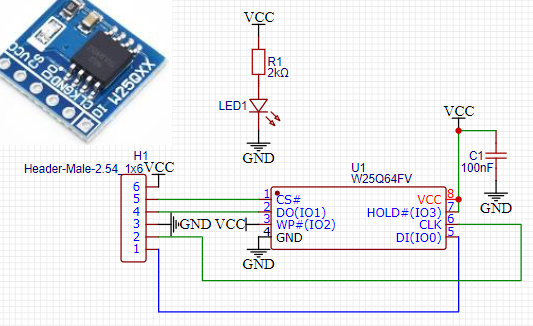
SPI wiring is simple, but voltage rules are strict.
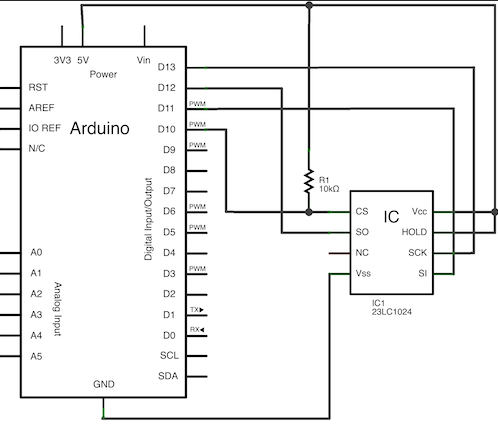
| Signal | Arduino UNO | W25Q64 |
|---|---|---|
| MOSI | D11 | DI |
| MISO | D12 | DO |
| SCK | D13 | CLK |
| CS | D10 | /CS |
| VCC | 3.3 V | VCC |
| GND | GND | GND |
Critical rules
- Use 3.3 V logic.
- Add level shifters if using 5 V MCUs.
- Pull CS high with 10 kΩ when idle.
- Keep wires short. SPI hates noise.
Good wiring prevents “ghost bugs” later.
SPI Configuration & Timing Considerations
The W25Q64 supports SPI Mode 0 and Mode 3. Mode 0 is most common.
Clock speed tips
- Start at 1–4 MHz.
- Increase only after stable reads.
- Long wires = lower speed.
SPI Transactions vs legacy SPI
- Use
SPI.beginTransaction() - Prevents conflicts on shared buses
- Essential in multi-device designs
Shared SPI buses demand discipline. One careless CS line breaks everything.
Arduino SPI Libraries for W25Q64
Choosing the right library saves weeks.
| Library | Strength | Best For |
|---|---|---|
| Arduino SPIFlash | Simple API | Beginners |
| Adafruit SPIFlash | Stable, FS support | Data logging |
| SdFat + Flash | Fast, advanced | Power users |
Selection advice
- Need file-like access? Choose filesystem support.
- Need raw speed? Use low-level drivers.
- Need portability? Avoid board-specific hacks.
The best library is the one you understand.

W25Q64 Arduino Example Code (Core Patterns)
Below is conceptual structure, not vendor-locked code.
flash.begin();
flash.readJedecID();
flash.eraseSector(0x000000);
flash.writeBytes(0x000000, data, len);
flash.readBytes(0x000000, buffer, len);
Common examples
- JEDEC ID read → confirms wiring
- String write/read → sanity test
- Struct storage → configs
- Large blobs → images, logs
- Index tables → file-system–like access
If JEDEC ID fails, stop. Fix hardware first.
Performance, Reliability & Power Optimization

Flash lives longer when treated kindly.
Performance tips
- Align writes to 256-byte pages
- Read sequentially
- Buffer writes in RAM
Wear-leveling basics
- Rotate sectors
- Avoid rewriting fixed addresses
- Use simple circular logs
Power saving
- Use deep power-down commands
- Wake-up time ≈ 3 µs
- Ideal for battery IoT nodes
“Premature optimization is the root of all evil.” — Donald Knuth
Optimize after correctness.
Sourcing, Quality & Supply-Chain Considerations
Engineering does not end at code.
Key procurement checks
- Buy from authorized distributors
- Verify laser markings and date codes
- Avoid “too cheap” offers
| Grade | Temp Range | Use Case |
|---|---|---|
| Consumer | 0 °C to 70 °C | Hobby, indoor |
| Industrial | −40 °C to 85 °C | IoT, factory |
Second-source planning reduces risk. Compatible alternatives exist, but always validate command sets.
Conclusion: Practical Takeaways
The W25Q64 remains a safe, proven SPI flash choice.
Remember
- Respect erase-before-write rules
- Use stable libraries
- Design for wear and power
- Source parts carefully
Start simple. Test early. Document everything.
That is how prototypes become products.
Next step: integrate wear-leveling and power-down logic, then validate under real workloads.
