


FT232RL Driver Download: Complete Guide to Reliable USB-to-UART Communication
Stable communication is invisible when it works—and painfully obvious when it fails. In embedded systems, industrial controls, and development labs, USB-to-UART reliability is non-negotiable. That is why the FT232RL remains a trusted solution decades after its release.
This guide is written for engineers, IT teams, and technical buyers who need accurate driver guidance, deep context, and zero guesswork. We focus on FT232RL driver download, installation, troubleshooting, and long-term deployment—clearly, practically, and at a 7th-grade reading level.
“Quality means doing it right when no one is looking.” — Henry Ford
Understanding the FT232RL USB-to-UART Interface
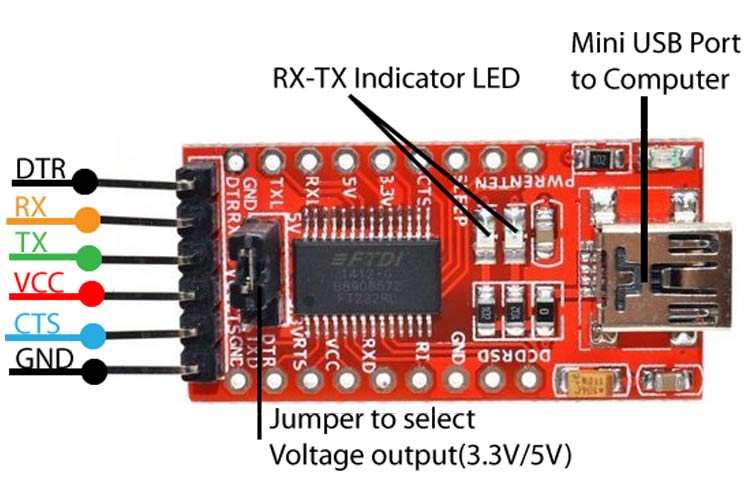
The FT232RL is a single-chip USB-to-UART bridge. It converts USB data from a computer into standard serial signals like TX, RX, RTS, and CTS. Simple job. Serious responsibility.
Inside the chip, a USB engine handles protocol timing, while a UART controller manages serial framing. An internal EEPROM stores configuration data. An integrated clock removes the need for external crystals.
The result is fewer parts, fewer errors, and predictable behavior across platforms.
Typical applications include:
- Industrial controllers and PLC interfaces
- Embedded development boards
- Test and measurement equipment
- Point-of-sale and kiosk systems
- Maker projects and evaluation kits
Why FT232RL Remains a Go-To Choice for Engineers
Technology moves fast. Reliability does not.
The FT232RL has survived OS changes, USB revisions, and security updates because its driver model is mature and well-maintained by FTDI.
Key reasons engineers still choose it:
- Native driver support on Windows, macOS, and Linux
- Signed, WHQL-certified Windows drivers
- Integrated EEPROM and clock reduce BOM risk
- Long lifecycle and strong ecosystem support
In critical systems, “new” is not always better. Proven often wins.
FT232RL Driver Download: What You Need to Know

Before downloading anything, understand what type of driver you actually need.
FTDI provides two driver models:
| Driver Type | Best For | Key Benefit |
|---|---|---|
| VCP (Virtual COM Port) | Most users | Appears as standard COM port |
| D2XX | Custom software | Direct API control, lower latency |
For most engineers, VCP drivers are the correct choice. They work with PuTTY, Tera Term, Arduino IDE, and almost all serial tools.
Important points:
- Always download from the official FTDI website
- Avoid random driver mirrors
- Use signed drivers for enterprise systems
Security matters. Drivers run at kernel level. One bad download can compromise an entire machine.
FT232RL Driver Download by Operating System

Windows (11, 10, 8, 7)
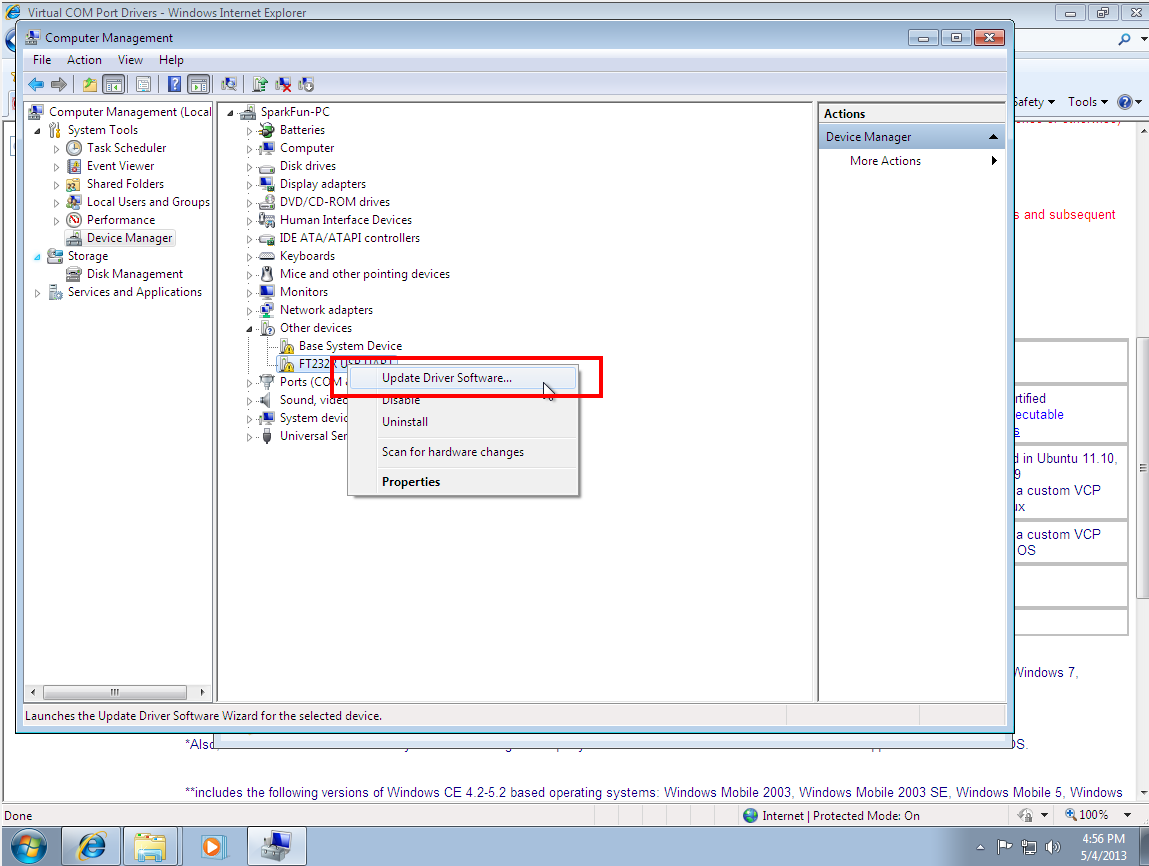
Windows 10 and 11 often install FT232RL drivers automatically through Windows Update. Plug in the device. Wait. Done.
Manual installation is required when:
- The system is offline
- Group Policy blocks updates
- You use a legacy OS
After installation, the device appears as USB Serial Port (COMx) in Device Manager.
macOS (Intel and Apple Silicon)
Modern macOS versions include basic FTDI support. However, security policies may block kernel extensions.
You must:
- Install the official FTDI driver
- Approve it in System Settings → Privacy & Security
- Reboot
Apple Silicon (M1/M2/M3) works fine—but only with updated drivers.
Linux
Linux is the easiest.
The FT232RL uses the built-in ftdi_sio driver. No download needed. Most kernels support it out of the box.
You may need to adjust udev rules to access /dev/ttyUSBx without root permissions.
How to Install FT232RL Drivers Correctly
Correct installation is boring. That’s good.
Windows steps (manual):
- Download the VCP driver from FTDI
- Run installer as Administrator
- Plug in device after installation
- Verify COM port assignment
macOS steps:
- Install driver package
- Approve kernel extension
- Restart system
- Verify device under
/dev/tty.usbserial*
Linux verification:
- Run
dmesg | grep FTDI - Check
/dev/ttyUSB0
Avoid shortcuts. Avoid unsigned drivers. Avoid pain.
How to Verify FT232RL Driver Installation
Trust, but verify.
Three reliable checks:
- Device recognition
- Windows Device Manager
- macOS System Information
- COM port assignment
- Ensure port number is stable
- Loopback test
- Short TX and RX
- Send data via terminal
- Confirm echo
Tools like PuTTY, Tera Term, and minicom work perfectly with FT232RL.
If data echoes cleanly, the driver is doing its job.
Common FT232RL Driver Problems and Troubleshooting
When things fail, patterns repeat.
| Problem | Likely Cause | Fix |
|---|---|---|
| Device not recognized | Bad cable or power | Replace cable |
| Unknown USB device | Driver conflict | Reinstall VCP driver |
| COM port keeps changing | USB port variation | Assign static COM |
| Code 10 / 43 | Corrupt driver | Clean reinstall |
One more warning: clone chips.
Some low-cost adapters use counterfeit FT232RL chips. Certain FTDI drivers intentionally disable them. The result? A “bricked” device.
FT232RL Clone and Counterfeit Driver Issues
This is where cost cuts hurt.
In 2014, FTDI released drivers that disabled counterfeit chips. The intent was IP protection. The impact was widespread device failure.
How to reduce risk:
- Source from authorized distributors
- Avoid suspiciously cheap adapters
- Use known-safe driver versions for legacy systems
In production, counterfeit risk equals downtime risk.
FT232RL vs Alternative USB-to-UART Solutions


| Feature | FT232RL | CH340 | CP2102 |
|---|---|---|---|
| Driver maturity | Excellent | Moderate | Good |
| OS support | Universal | Limited macOS | Good |
| Clone risk | Medium | Low | Low |
| Industrial trust | Very high | Low | Medium |
Many engineers still prefer FT232RL because predictability beats price.
Enterprise and Industrial Deployment Considerations
In corporate environments, drivers must be:
- Signed
- Auditable
- Repeatable
FT232RL drivers meet these requirements. They deploy cleanly via imaging tools and comply with IT security policies.
For regulated industries, this matters more than unit cost.
FT232RL in Production and Quality-Sensitive Environments
Mature silicon reduces surprises.
FT232RL is used in certified products worldwide because:
- Lifecycle is stable
- Documentation is clear
- Behavior is consistent
QA teams value repeatability. Supply managers value traceability. FT232RL delivers both.
Final Thoughts
FT232RL driver download is not just a setup task. It is a reliability decision.
Choose official sources. Understand your OS. Respect counterfeit risk. And remember:
“The bitterness of poor quality remains long after the sweetness of low price is forgotten.”
If you want, I can next:
- Provide direct official driver links
- Create a quick troubleshooting flowchart
- Or write a buyer’s checklist for sourcing genuine FT232RL chips
Just tell me.
